


01
Consolidated portfolio view
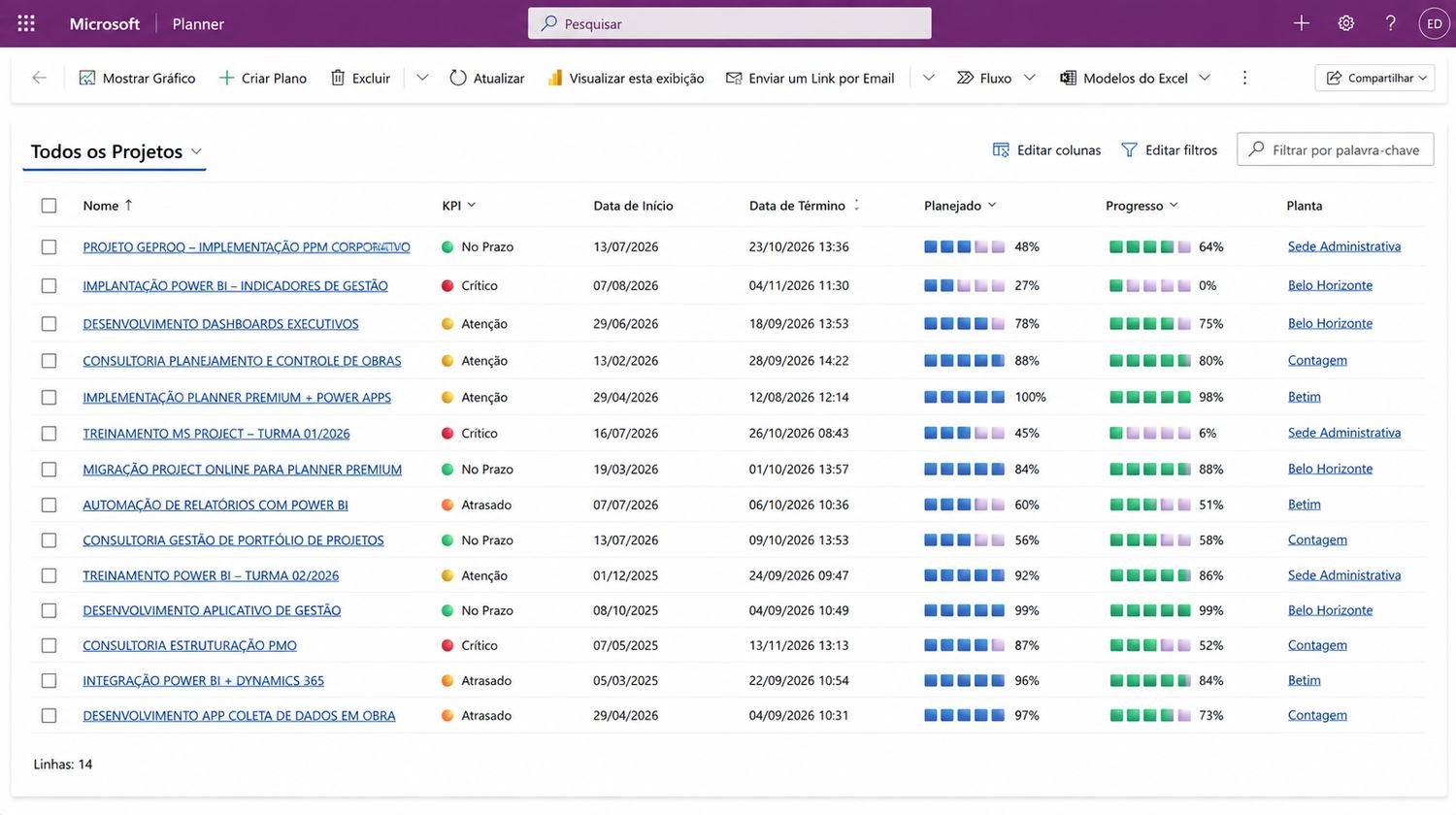
Projects, deadlines, progress, priorities and indicators organized in a single executive view.
 Introducing Project Connect
An integrated PPM solution that connects strategy, portfolio, projects, resources, processes, data and intelligence, built on Microsoft 365 and adapted to your organization's reality.
The goal is not simply to adopt a tool, but to evolve into a more integrated, collaborative management environment ready for new digital and AI capabilities.
Project Connect connects technologies, processes, people and information, turning the set of Microsoft tools into an integrated project management platform. The solution was developed by the GEPROQ team, combining project management experience with technical mastery of the Microsoft 365 ecosystem.
 Microsoft Project
 Microsoft Planner
We developed the solution that connects Microsoft Project and Microsoft Planner, combining advanced scheduling with day-to-day collaboration in a single solution. If your team still wants to keep using Microsoft Project Professional, it can remain part of the environment without losing integration with the rest of the solution.
Explore some examples of environments and reports used in project and portfolio management.
Note: the screens shown are illustrative examples. The names, indicators, dates, values and other information displayed are sample data, used exclusively to demonstrate the solution.
 Enlarge image ↗Sample data
Real portfolio example: projects, KPIs, dates, planning and progress in a single view.
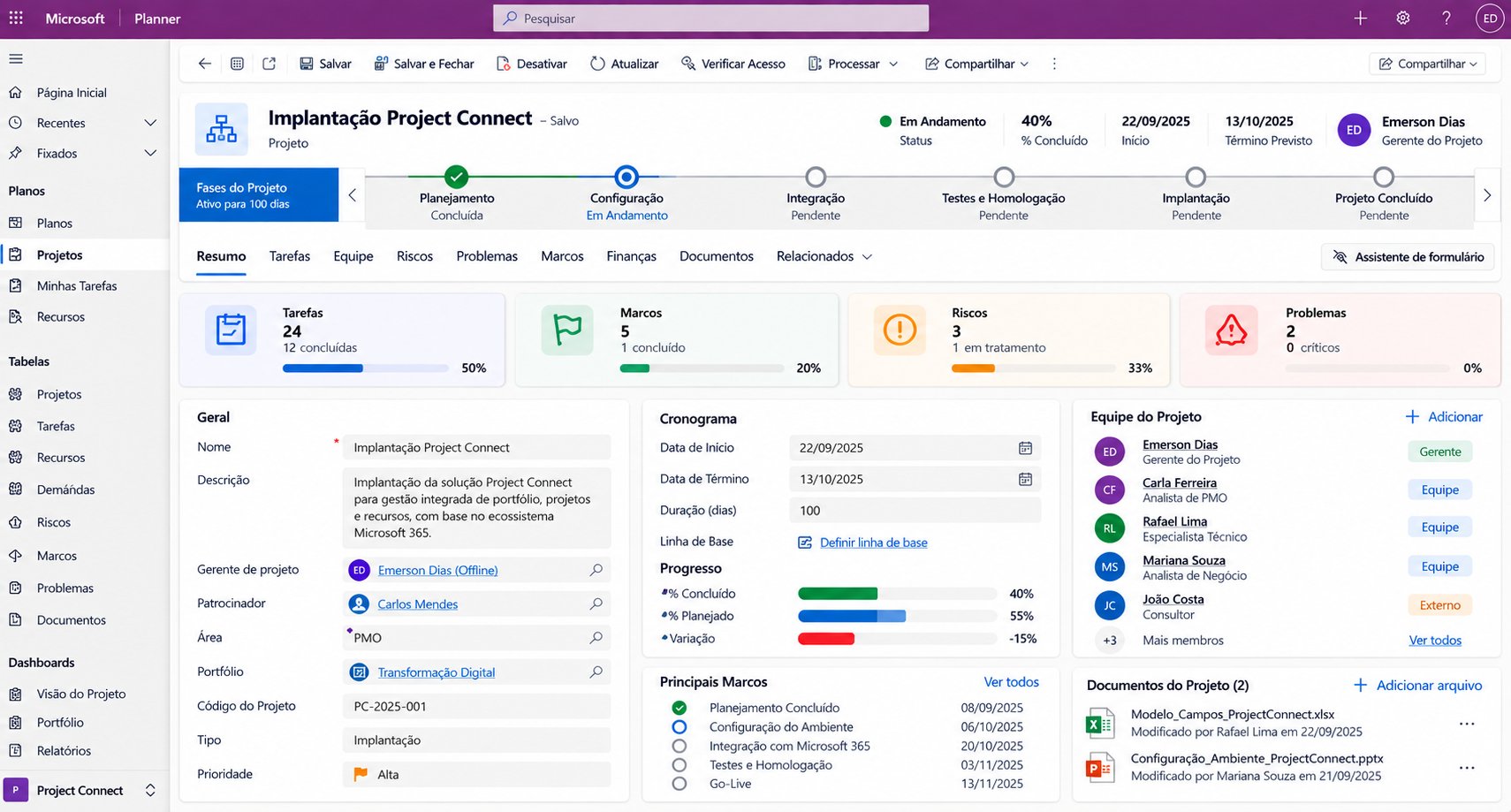
Real project example: planning, deadlines and timeline tracking of activities and deliverables.
One-page executive summary: dates, effort, progress, indicators and the project's main interactions.
Real task-level example: a collaborative environment with the responsible team, documents and history of related actions.
Companies that run projects as a core part of their business and need governance, visibility and control over multiple fronts at the same time.
Suggested industries based on multidisciplinary project profiles and high portfolio complexity, adjustable to the sectors you serve today.
What project management looks like in an organization without a PPM structure, and what changes with Project Connect, dimension by dimension.
| Dimension | Current state (AS IS)No PPM structure | With Project Connect (TO BE)Integrated PPM on Microsoft 365 | Gain for the organization |
|---|---|---|---|
| Portfolio Management | ★☆☆☆☆Projects tracked in isolation, with no consolidated portfolio view or clear prioritization criteria. | ★★★★★A single portfolio connected to projects, resources, indicators and corporate processes. | An integrated view to prioritize and decide. |
| Resources & Capacity | ★☆☆☆☆Allocation tracked in spreadsheets and emails; overloads only surface once they have already delayed the project. | ★★★★★Resources, capacity, demand and allocations structured around the organization's process. | Clarity on available and committed capacity. |
| Governance & Methodology | ★☆☆☆☆Each department runs projects its own way, with no defined stages, approvals or standards. | ★★★★★Stages, approvals and rules configured to the organization's methodology: agile, waterfall or hybrid. | Standardized governance aligned with the business. |
| Risks & Issues | ★☆☆☆☆Risks handled reactively, once they have already become issues. | ★★★★★Risks, issues, owners, deadlines and action plans integrated into the process. | Deviations anticipated and addressed. |
| Planning & Execution | ★★☆☆☆Outdated schedules disconnected from teams' day-to-day tasks. | ★★★★★Planning connected to execution, with Project and Planner Premium integrated. | Planned and actual always aligned. |
| Indicators & Visual Management | ★★☆☆☆Reports built by hand, with outdated data and conflicting versions. | ★★★★★Up-to-date Power BI dashboards for every management level. | Faster, data-driven decisions. |
| Processes & Automation | ★☆☆☆☆Approvals, follow-ups and updates done by hand, with heavy PMO effort. | ★★★★★Automated approval, notification and update flows. | Less operational effort and more time for analysis. |
| Integration & Information | ★☆☆☆☆Information scattered across spreadsheets, emails and folders, with no single reliable source. | ★★★★★Projects, tasks, resources and documents connected in a single source. | Integrated, reliable information. |
| AI / Copilot / Management Agent | ★☆☆☆☆Analysis depends entirely on manual effort. | ★★★★★Copilot and AI agents supporting analysis, planning and reporting. | Higher productivity and decision support. |
| Scalability & Evolution | ★☆☆☆☆Makeshift controls that can't keep up with a growing project portfolio. | ★★★★★A modern, modular architecture on Microsoft 365 that evolves with the business. | Management that scales without added complexity. |
Conceptual and illustrative comparison. The current state represents a typical scenario for organizations without a PPM structure. Results depend on the solution design, product versions and licensing contracted.
One of Project Connect's key differentiators is the ability to extend the solution through the Power Platform, without being limited to the native features of the planning environment.
Portals and apps for project intake and tracking
Specific Project Charter forms and processes
Automated approvals for projects, budgets, schedules and changes
Custom notification flows and controls
Solutions for risks, issues, demands and governance
Data integration with corporate systems via connectors and APIs
Apps tailored to PMO needs
Continuous evolution of the solution as new requirements arise
Four services that support PPM implementation and evolution in your organization.
Complete structuring of the governance and tracking model on the Project Connect architecture.
Implementing Planner Premium as the central environment for executing work.
Complete support for the transition from Project Server, Project desktop and spreadsheets to Project Connect, reducing complexity.
Structured assessment of the current maturity level of processes and tools.
A structured, staged journey, from assessment to continuous evolution of the solution.
Assessment of the current environment and management processes
Mapping the needs of the PMO, managers and teams
Defining the solution architecture
Configuring the environment and other components
Data and system integration, when applicable
Development of specific apps and automations
Building indicators and dashboards
Testing, validation and adjustments
Training and knowledge transfer
Go-live and tracking of ongoing evolution
Reference estimate: timelines may be adjusted according to requirements gathering and the complexity of each organization's environment.
Project Connect connects portfolio, projects, resources and indicators in a single management model.
Projects, deadlines, progress, priorities and indicators organized in a single executive view.
Clear criteria to prioritize initiatives, track decisions and focus effort on what creates the most value.
Continuous monitoring of planned vs. actual, progress, delays and points that need attention.
Greater clarity on effort, availability, demand and capacity to sustain the portfolio.
Indicators and dashboards turn operational data into information for faster, more accurate decisions.
A foundation ready to integrate Planner Premium, Power BI, Power Apps, Dataverse, Dynamics 365 and AI, with an implementation aligned to each organization's processes and governance.
Answer 10 objective questions and receive a preliminary assessment. At the end, we send the result straight to our WhatsApp so the team can review it with you.
Your answers have been sent to the GEPROQ team. We will review them and get back to you shortly.
GEPROQ – Project Management and Quality has spent more than 10 years helping companies transform the management of projects, construction and portfolios.
Our experience combines specialized consulting, professional training and technology applied to management, helping organizations structure processes, develop people and turn information into better decisions.
Along the way, we have worked with more than 100 companies and trained more than 3,000 professionals, across different industries and organizational contexts.
Building on that experience, our team developed Project Connect, our own PPM solution for the Microsoft 365 ecosystem.
Processes, PMO, governance, planning, control and portfolio management.
Professional development in projects, Project, Planner, Power BI, AI and Copilot.
PPM, Power BI, Dataverse, Dynamics 365 and integrated Microsoft solutions.
You can take advantage of the evolution of the Microsoft 365 ecosystem to build a PPM solution that is more integrated, modern, flexible and aligned with the reality of your business.
Choose your path: a commercial proposal, a solution demo, a WhatsApp chat or a meeting with the team. If you prefer, take the maturity assessment first.

Consulting, training and technology in project management for companies that need to turn planning into results.
Av. Raja Gabáglia, 2000Solutions
Courses